I shall assume you have some knowledge of what LTO is, but I shall summarise to ensure the basic premises are agreed upon: LTO is a format for storing data on tape. There were once competing tape formats, but these days all but LTO have fallen into obsolescence. In theory LTO is an open standard, with any manufacturer able to make tapes or drives - but in practice there are only three such manufactures. LTO tapes are cheap in terms of per-terabyte cost, but this is balanced by the high cost of the drives and supporting equipment, so the economics tilt in favour of LTO only when storing very large amounts of data. It is common in enterprise backup situations.
But I am not an enterprise. I'm a hobbyist, and I have a lot of data to back up from my various projects. So I fell in to the trap: LTO on the cheap. Can it be done? Yes, but you will pay the price in sanity.
To help others who follow in the path, here is an account of my struggles. These are notes written both during and after the attempts, to disregard the shifts of past and present tense.
To use LTO, you need a few things. A drive, of course. Some tapes to put in it. Additionally these drives invariably interface by SAS, so you're going to need a suitable PCI-E SAS interface or an actual server to put the drive in. Then some cables and, finally, a computer that can run it.
Not just any old PC, because LTO has an annoying quirk: It must be kept fed. The tape, once moving, needs a constant stream of data. Should this data be interrupted the tape must stop, rewind, seek, start moving again, and repeat. This puts excessive wear on tape and drive. For the LTO-5 drives I use this data must come in at 140MB/s - more if it is compressible, which mine isn't. That's faster than gigabit ethernet can handle. That's faster than most mechanical drives can read if any time for seeking is needed. It's faster than many filesystems can be parsed when you are backing up directory structures with millions of small files.
The solution to this is disk-to-disk-to-tape: A dedicated scratch drive (these used to be RAID0 arrays, but now are likely just SSDs) that serves as intermediate storage. The backup is made to this, and then copied from there to tape. Either a whole backup job at once, or just one tape-worth of data at a time.
Brand new LTO equipment is expensive. Too expensive for a hobbyist. Fortunately it is affordable on eBay. Mostly.
And so I have my plan:
2x LTO-5 drives, extracted from an old HP tape library.
1x Modern desktop, AMD, with 16GB of DDR5 memory - it doubles as my video encoding box.
Appropriate cables.
And a SAS card.
The drives are a fortunate salvage find - it's always worth keeping an eye out for things to intercept on their way to the bin. These came in the form of an HP StorageWorks tape library (Sadly sans tapes, which were all removed for data protection reasons by the former owner). The library is an over-sized monster for my needs, but after much savaging with the screwdriver I was able to remove the drives - and to my great satisfaction they are of the standard 5.25" size with appropriate screw placement, with SFF-8482 data and Molex power - they can almost be extracted and put into a desktop case. Almost, because they lack the faceplate - drives for use in robotic tape libraries do not have that, and would certainly suffer from dust without it. They still have the eject button though, confirming that the drives themselves are nothing special - the only way those intended for the library differ from those intended to go in a conventional 5.25" bay is the removal of the faceplate.
To this end I got a case with a door covering the drives - or at least the picture of a door. On actually receiving it I found that the 'door' was nothing but a moulded plastic outline in a very solid plastic plate - while the case has two 5.25" bays, there was no way to access them from the front, making them entirely useless for optical (or tape) drives. I'd been scammed! Much work with my rotary tool was able to 'rectify' this, and a bit of electrical tape and scrap gives the drives a new dust cover.
Perhaps this was an omen.
Those SAS cards turned out to be the problem, because the sort of SAS hardware one might get cheap on eBay is fairly old - from 2008 to 2013 - and often designed specifically for use in a particular line of servers. Trying to make this work in a modern PC brings trouble, and so much delay was experienced in getting a series of SAS cards.
The first card, an Adeptec, fails to detect at all.
The second, an HP, renders the computer unbootable so long as the card is fitted.
A third seems hopeful, but cannot work without configuration performed using the option ROM - an option ROM that a modern UEFI-based firmware cannot load. I think card #2 trying and failing to do this was the cause of the problem.
Finally, card #4 works, having by this point exceeded my budget in cards alone. A card Linux helpfully calls a "RAID bus controller: Hewlett-Packard Company Smart Array G6 controllers (rev 01)". This monster of a card is a FULL SIZED expansion card with no less than four external and two internal SAS connectors. A card so long it requires removing the front cooling fan from the case to fit it in. With so many SAS connectors, this card must once have been the pride of some high-end storage server. In to this goes the drive and a few old SSDs - the controller will RAID0 these, saving me from having to buy scratch storage if I can make the three differing models of drive play nicely together.
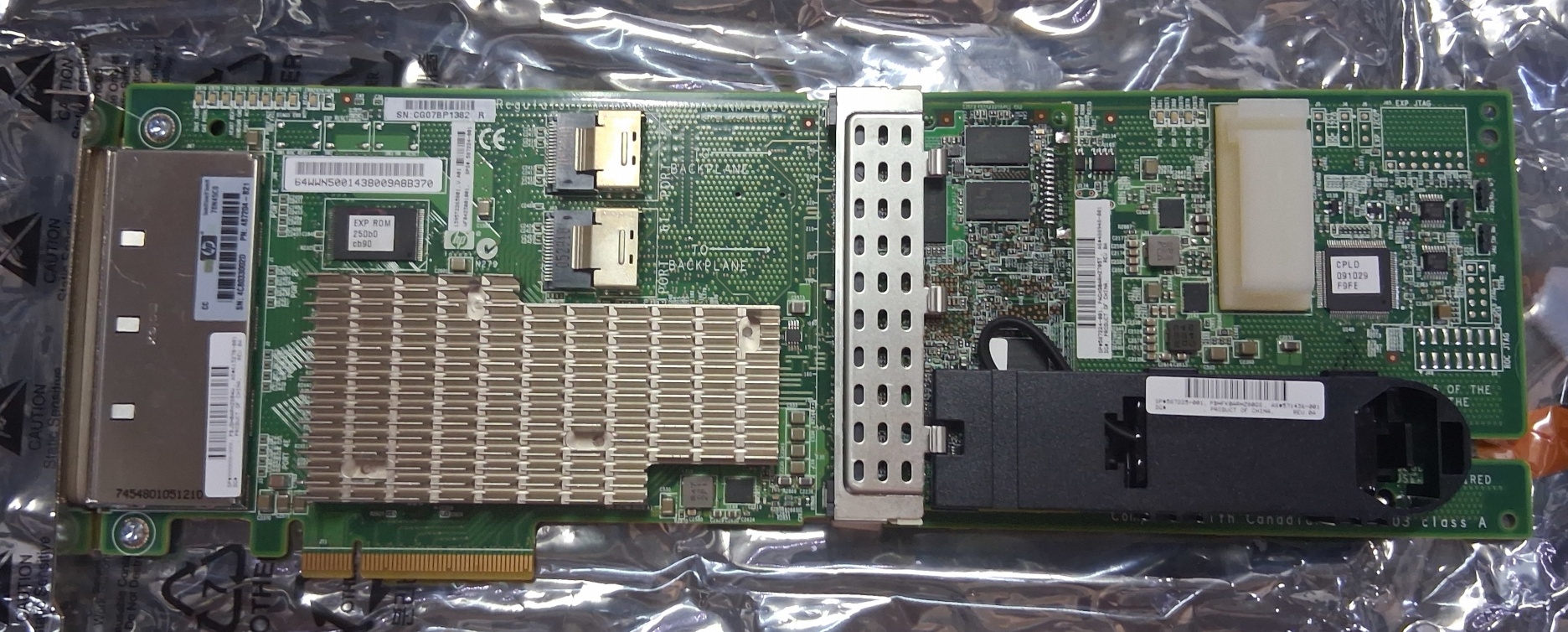
Alas, the problems continue: The card is happy to work with the LTO drive, but the connected hard drives are distinctly undetected. It appears that in order to use these drives they must be set up in the card option rom, and as with card #3, there is no way to fix this. Trying to configure the firmware to CSM boot mode only results in a computer that freezes on boot, and somehow even removing the SAS card doesn't fix this - it can only be un-bricked by shorting the firmware reset jumper.
Technology marches on, and these thirteen-year-old cards just aren't compatible with a modern UEFI-based computer.
I remember that on Adaptec cards it is possible to use some very nice storage management software to configure drives. HP does have something similar: "HP Array Configuration Utility." Such hopes are soon dashed though - the software has not been updated since 2013, in an RPM file with so many dependencies it is easier to break apart and examine manually than to install through normal means. Getting this to work takes some effort, but by extracting the RPM and installing each file with appropriate permissions it can be done. The software actually works - it can correctly identify the controller, it can retrieve information like the serial number, firmware version, status of the write-through cache battery (absent), amount of onboard cache... and it detects the 'missing' drives. Though curiously doesn't show the tape drive: That type of drive is beyond the scope of volume management, but rather just raw commands passed through the controller, which is why it showed even when the controller was not configured. Such is the way of SCSI controllers. SCSI devices which are not hard drives or SSDs are the OS's concern to deal with, the controller is simply a forwarder of data for those.
For testing purposes just one drive is hooked up. The plan is to use three 256GB drives in RAID 0, because I have these drives (all of different models) lying around in the spare parts box. The mainboard doesn't have enough SATA ports anyway, so they have to go on that SAS controller. For now it just sits inactive while I work on tape storage.
There are two common ways to store data on LTO tape, not counting proprietary backup software. These are the venerable TAR, and LTFS. There's a third today, which I'll get to later.
The tar format has been around since ancient times - 1979, according to Wikipedia. It works as well today as it did then: It takes a bunch of files, bundles them together, and streams the output in a format ready to go on tape. It will work as happily with a modern LTO drive as it did with a 1980s reel-to-reel data tape cabinet, with a little tuning.
LTFS brings something a bit like a familiar filesystem to tape - presenting the contents of the tape with a familiar directory structure, in which files may be easily copied on to the tape. A tape is quite unlike a hard drive, but LTFS makes it appear like one to software. Unfortunately it kind of sucks - it results in horrible back-and-forth tape motion if opening a lot of files on a tape (like, say, when a file browser decides to open all those images to make thumbnails). It also doesn't allow for actually deleting files, merely removing them from the index but not reclaiming the space. Useful in some scenarios, such as when running only incremental backups, but cumbersome.
Many more days were spent learning how much LTFS sucks. The software is not an easy install.
So, tar it shall be. But this brings us to the next question: Block size. Tar refers to this as 'blocking factor' which must be a multiple of 512 bytes. The default blocking factor is 20, giving a block size of 10KiB. In 1979 that was a good chunk of data, and a good chunk of system memory too - this was the tail end of the magnetic core memory era. Today though, it's tiny - the overhead of dealing with such small blocks is significant. And so begins days of testing different block sizes. The largest the drives will take is 1MiB. After much throughput testing, the ideal size seems to be 1MiB too.
Finally, I am able to back up files! But only locally. Even with a 2.5Mbit network connection to the server, it can't guarantee a sustained 140MB/s read speed. It can achieve that when copying a single large file over, but when tar is busy assembling millions of small files into an archive format the throughput drops far too low. Fortunately this problem is something I anticipated, and I already know the solution: mbuffer.
mbuffer is a program which may sit between tar and tape, accepting a stream of data from tar, providing a huge buffer, and outputting to tape. The size of this buffer is not limited by RAM: It can also use a memory-mapped temp file, and doing this works perfectly. So perfectly in fact that I realise that all that fiddling trying to make a set of hard drives work isn't strictly needed for testing: I can just write 30GB of data at a time to the tape, this being how much storage is free on the quite-fast-enough OS drive. This won't do for long-term use, but it means I can run my first full-length backup, and so test a 'restore' if only to /dev/null.
And so, my final backup command:
tar -c -b 2048 /media/dataset1/ |mbuffer -T /tmp/tape.buf -s 1M -m 30G -P 95 -o /dev/st0
Hallel-bloody-ujah.
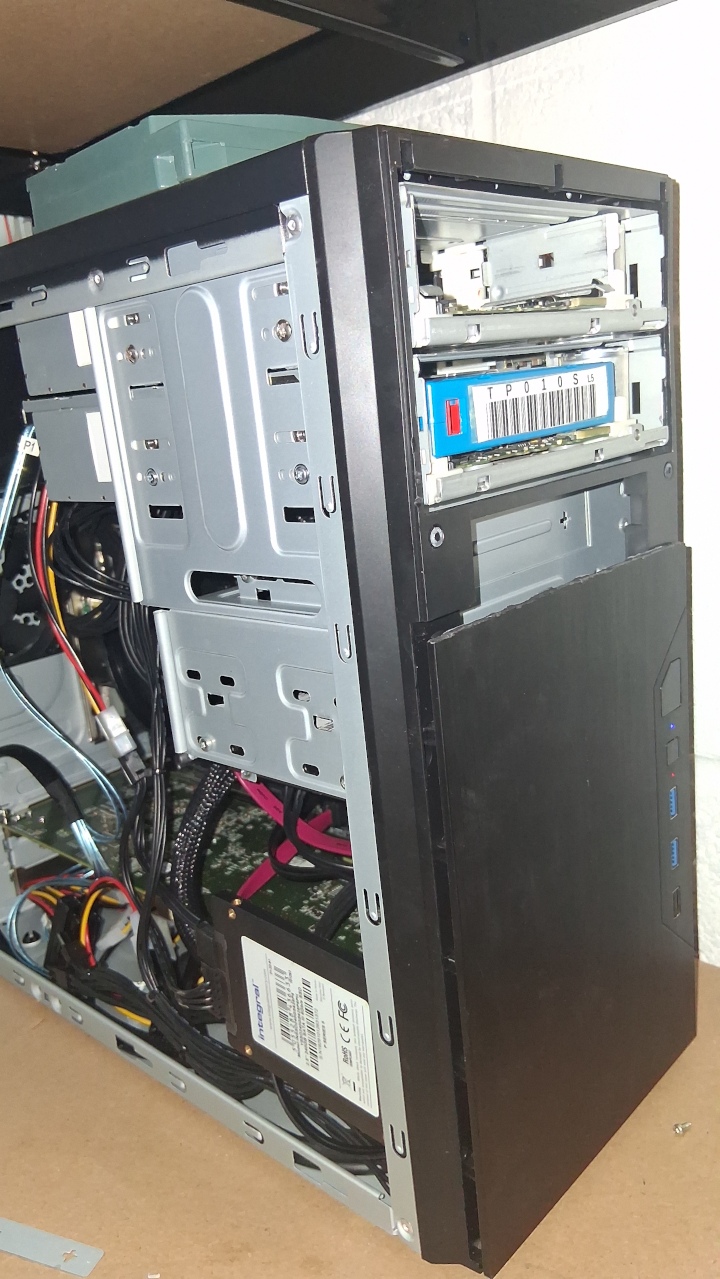
When working on the large folder of small files the tape stops moving, waiting until the buffer is full up again. Performance in this stage is abysmal, but it does work: I have a successful tape backup. This also allows for testing the behavior when a tape is full: With mbuffer doing the actual writing to tape, mbuffer is responsible for handling this event.
in @ 6137 kiB/s, out @  0.0 kiB/s, 1424 GiB total, buffer  15% fulll
volume full - insert new media and press return when ready...
mbuffer was made for tape. It knows what to do. It also has a little output error I see there.
Incidentally, LTO tape doesn't actually have a fixed capacity. It uses transparent compression, so some data written may be compacted and take up less space on the tape. It can lose space when tape has to stop due to lack of data, as the resumed writing will leave a small gap. It will also lose space if a block of data fails to verify and must be re-written. It is full when the tape runs out: On this test it stored 1,424GiB, but if I were to continue the next tape might contain a few GiB more or less.
It's also worth noting that every tape will bear two capacity labels: The big number is what you can expect to store when accounting for the tape drive's built-in compression, and the small number below is the actual storage capacity. The big number is known in the industry as a 'bald-faced lie.' Most of what is going on that tape is already compressed, and so the tape drive's compression capabilities will be minimally useful.
The big performance problem here comes from the folders with lots of small files. Some insight in to this can be gained by just running a benchmark command on the file server, which skips the complication of NFS:
ubuntu@smallserv:~$ tar -c /media/dataset1/ -b 2048|mbuffer -o /dev/null
tar: Removing leading `/' from member names
in @  0.0 kiB/s, out @  0.0 kiB/s,  256 MiB total, buffer   0% full^C
mbuffer: warning: error during output to /dev/null: canceled
summary:  261 MiByte in 33.4sec - average of 8006 kiB/s

ubuntu@smallserv:~$ tar -c /media/dataset2/ -b 2048|mbuffer -o /dev/null
tar: Removing leading `/' from member names
in @ 41.9 MiB/s, out @ 41.9 MiB/s, 2000 MiB total, buffer   0% full^C
mbuffer: warning: error during output to /dev/null: canceled
summary: 2003 MiByte in 30.1sec - average of 66.5 MiB/s
Data set 1 is a large number of small files stored on a raidz1 of SATA SSDs. Data set 2 is all multi-gigabyte files stored on a raidz2 of mechanical hard drives. Some further testing by copying test sets from one to the other (and being careful to nullify the effects of zfs caching) confirms my suspicions: It's the process of taring up all those tiny files that slows it down to less than 10MiB/s. Further, even the 'fast' large files are still not fast enough to keep the tape fed. My fileserver was specified for low power usage, not performance. It depends on one fast NVME drive that serves as cache for the slower arrays, but this does not help with a backup job.
I'm going to have to use d2d2t, and I think a 30G buffer isn't going to cut it. It suffices for testing purposes.
If I were willing to spend money I could simply stick a 2TB NVME drive in that temptingly empty m.2 slot, but that would be admitting defeat. There are many problems in life which can be solved by throwing money at them. Perhaps most are such. I could simply spend a heap of money on some USB-C enclosures and a bunch of 20TB drives and not need to mess around with tape at all, but I would rather enjoy the challenge - even with these frustrations - of working with what limited materials I can scavenge. This is a hobby project, after all.
What follows is mostly shifting data around to make the first folder I wish to back up fit into 1.5TB, the capacity of a tape. LTO tapes can generally write one generation prior, and my bargain-hunting ways have found a mixture of LTO4 and LTO5 tapes - the LTO4 has a capacity of 800GB, the LTO5 1,500GB, but both numbers are somewhat approximate for the aforementioned reasons.
There are ways to coax more performance from ZFS. High-performance caching drives, optimising block size, use of compression, disabling atime. All ways already done - I've done the optimisation thing before, and caching is of no help on a backup job anyway.
Getting faster reads shall not be so easy. There is an intended solution for this situation: One lesser-known ZFS feature is the ability to serialise a snapshot, a means of turning a whole dataset into a stream in a very high-performance manner. This functionality is there for the purpose of making backups and migrating whole filesystems, and it is exactly what I need. There is a drawback, naturally: Such a backup can only be restored to another ZFS filesystem.
ubuntu@smallserv:~$ zfs snapshot flash/dataset1@testbackup
ubuntu@smallserv:~$ zfs send -w flash/dataset1@testbackup |mbuffer -o /dev/null
in @  0.0 kiB/s, out @  0.0 kiB/s,  576 MiB total, buffer   0% full^C
mbuffer: warning: error during output to /dev/null: canceled
summary:  581 MiByte in 17.1sec - average of 33.9 MiB/s
Much faster. And a little cumbersome, as it requires creating and later destroying a snapshot, which means nervously running potentially very destructive commands as root. There are some advantages to this approach though.
One particular annoyance, if the communication is interrupted at any point, the backup will fail and must be resumed - while with NFS a loss of connectivity merely results in access hanging indefinately until access is restored. Fortunately these servers are on the same switch, so there is no reason communication might be interrupted.
Setting this up isn't too difficult, for someone who's been around long enough to remember the old ways. When you need a server to just listen for a TCP connection and run a process, that is what inetd is for. Install that, a little editing in inetd.conf and /etc/services, and...
ubuntun@smallserv:~$ nc localhost 8001 > test.bin
^C
ubuntu@smallserv:~$ file test.bin
test.bin: ZFS snapshot (little-endian machine), version 86507537, type: ZFS, destination GUID: 02 7B 05 FFFFFFC4 FFFFFF8A FFFFFFFE 3B FFFFFFF3, name: 'flash/dataset1@testbackup'
Very nice. And if I then make that work on my server with the tape drive:
ubuntu@CoProcessor:~$ nc 192.168.88.4 8001 |mbuffer -T /media/tmp2/tape.tmp -s 1M -m 210G -P 95 -o /dev/st0
mbuffer: warning: high value of number of blocks(215040): increase block size for better performance
mbuffer: warning: allocating more than half of available memory
in @ 18.0 MiB/s, out @  0.0 kiB/s,  0.0 kiB total, buffer   0% full
The 'in' figure fluctuates wildly - and for this test I've hooked up one of the 256GB SSDs to serve as my buffer. It fluctuates, but it's clearly a lot faster than NFS was. Still not fast enough to keep up with the tape drive though, but now I might be able to back up the whole set in only a week or so!
Well, that took a while. And some money. Fortunately not very much money compared to the cost of a hard drive system, because the most expensive parts - the tape drives - were available assalvage, and the controllers and cables came off of eBay.
Tape storage isn't for everyone, but with the cost of hard drive storage right now (I am writing this during the 2026 AI bubble and demand crunch) it is something the tech-tinkering data hoarder should look in to. I see LTO-5 tapes on Amazon for as little as £5, which is £3.33 per terabyte. A 20TB hard drive, by way of comparison, is £430 - £21.50 per TB. Tape storage is also very self-stable if stored in accordance with the manufacturer's instructions - this is not cheap consumer tech, this is enterprise-grade hardware, it is made to last.