I find myself in temporary possession of a Behringer SU9920 or 'sonic ultramizer.' This belongs to my workplace, and I am borrowing it so that I may make a decision: Is this a gem of audio performance that we have been ignoring abandoned in the drawer, which should be moved into the rack and patched in? Or is it just some audiophone nonsense which should be relocated to the WEEE recycle pile?
Behringer's website is of no help at all in this, because it says absolutely nothing about what the device actually does. It uses such worthless audiophone ramblings as "Dramatically improves your sound by adding clarity, dimension and depth" and "improves the performance of any sound system by adding sparkling high end and super-tight bass." The only controls are a two knobs for each of the two channels labeled "process" and "low contour," meaningless labels that describe nothing, and a bypass switch.
Amusingly the website also says that when used with "5.1 and hi-fi setups: DVDs become stunningly lifelike and the spatial dimension of your sound system increases dramatically." The SU9920 has only two channels. Perhaps you are supposed to buy two of them?
There is no mention of BBE's more famous 'Sonic Maximiser' device either, though the resemblence cannot be denied: Behringer has drawn some obvious inspiration from their rival.
Such a level of audiophile nonsense without any technical information does not inspire confidence.
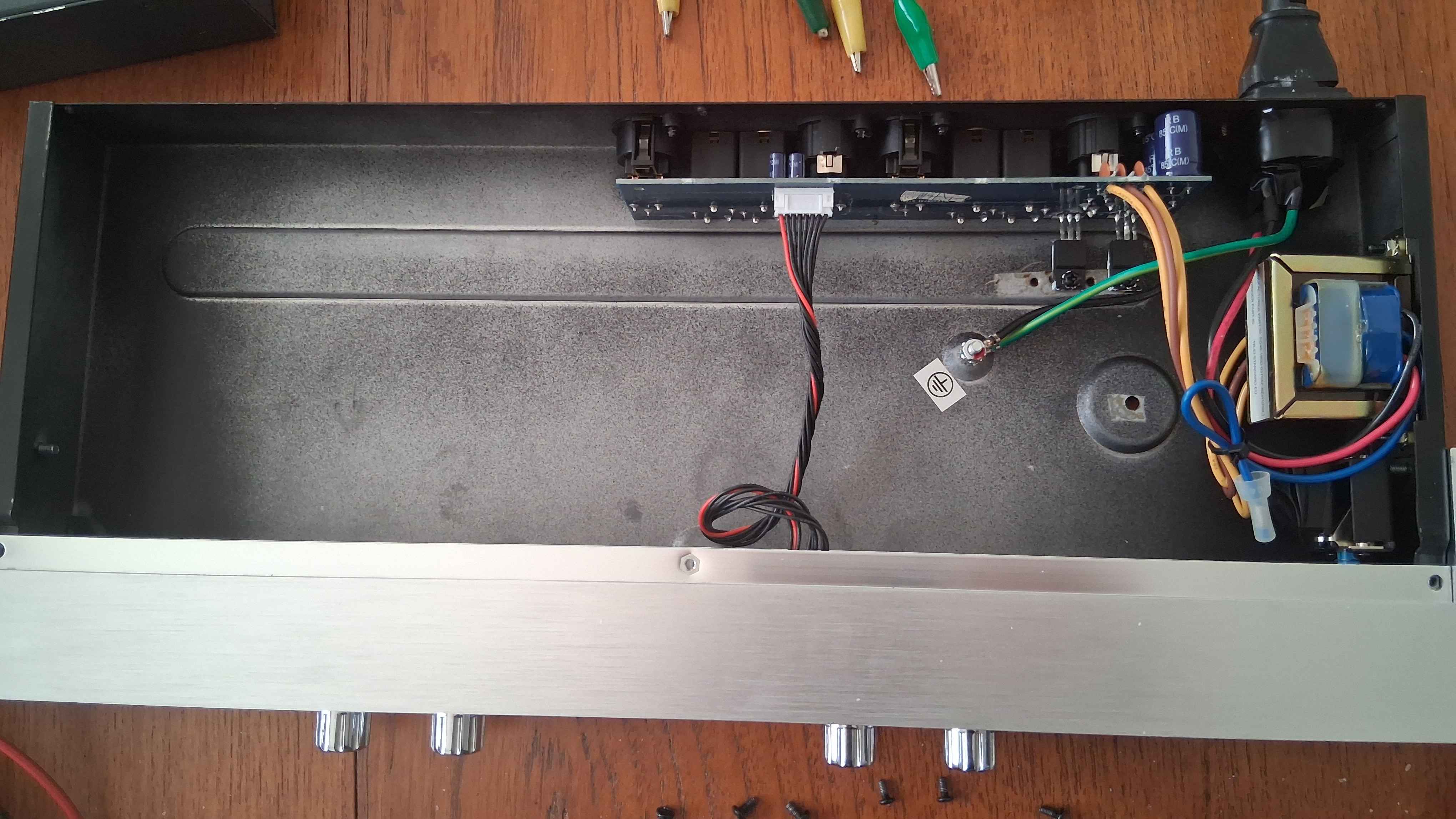
Nor does the noise when the power switch is pressed: The ultramizer hums, quite loud enough to be annoying. Opening it up reveals the cause of this: The power supply is a fairly unremarkable linear type with an entirely ordinary little transformer - probably an EI type - mounted to the side of the case, feeding regulators for ±15V rails. This transformer leaks a fair amount of magnetic field - enough that just holding a screwdriver up to it the vibrations can be felt. With the case closed the case panel vibrates, producing the hum.
This may not always have been the case though, for there is a conspicuous empty spot with a centering nub and screw hole present that marks where a toroidal transformer isn't. There can be only one explanation for this: The case was designed for a toroidal, which was later substituted for a lower-cost EI transformer. This cost-cutting measure is the source of the annoying hum. It wouldn't be difficult to retrofit with a toroidal transformer to fix this, but I certainly wouldn't want to use the ultrramizer as-is. Perhaps there are silent ultramizers around elsewhere of an earlier revision which did not resort to this ill-considered cost-cutting.
A quick probe of the regulators also finds they are regulating 26V down to 15V. This explains why they are attached to the case to use it as a heat sink! Given how little power the ultramizer uses though, efficiency is not a serious concern.
Other than the source of the hum there is little to see within: Most of the case is simply empty. A small board at the back holds the linear power supply, connectors, and some electronics for managing balanced audio. A small board on the front holds the controls and (hidden from view without further disassembly) presumably the DSP chip, but most of the case is just empty. It could have been built much shallower, though I suspect the excessive size may be a deliberate decision to give further illusion of quality.
Another mild annoyance is that those balanced audio chips need power: The 'bypass' doesn't truly bypass, so you can't leave this powered off and still patched in. No power means no audio going through.
This advertising doesn't actually say what an Ultramizer is. There are three hints, though. These hints are all we get to try to work out what it does.
The first is tucked away in the specification sheet: A command describing the ultramizer as a "3-band phase delay and dynamic filter." That's a fair desciption of BBE's Sonic Maximiser, and further suggests that the Ulramizer is Behringer's attempt to create a similar product.
The second hint is in the manual for an entirely different Behringer product, the Virtualizer Pro DSP2024P multi-function effects unit. Among the many effects it can offer is 'ultramizer.' The manual describes this: "The ultramiser function divides the sound spectrum into two frequency bands and, as a result, allows inaudible but extremely effective compression. This is especially helpful during mix-down. The DSP2024P analyses the received audio material and automatically adjusts input gain and compression parameters."
The ultramizer's own manual states it is a three-band device, but if the description in the DSP2024P's manual is applicable to the SU9920 as the name suggests, that could potentially explain what magic the ultramizer is trying to do: Split the audio into three bands, apply a compresser to each of these independently, and combine them. There is a distinct lack of controls for any compresser though, so this is really just speculation. If that is the case, this is actually a quite interesting processing operation.
Finally, a third hint: The Ultramizer is obviously inspired by the aforementioned and better-known BBE Sonic Maximizer. Like the Ultramizer, the Maximizer's marketting is devoid of technical details, but it is rumored to work by splitting the signal into three bands, applying a slight delay to the middle band and a slightly greater delay to the lower, then putting them back. This is supposed to do something involving phase compensation, though the logic of this isn't entirely clear - perhaps it is a purely psychoacousic effect that makes high frequencies more apparent by placing them a few miliseconds before they would be swamped by lower frequencies. This would be in line with the description in the specification sheet: "3-band phase delay."
One thing is certain though: Just twiddling the knobs while running some music through, it's instantly obvious that it also functions as a basic equaliser.
After connecting up some janky wiring to link to the audio out and in sockets on my PC, I can run test signals through it allowing for both my own subjective judgement and some more objective measurements, feeding through a frequency sweep. I am not including the recordings because they really don't give any insight that I can't just describe.
This brings attention baco to those two controls (per channel) labeled, unhelpfully, "Low Contour" and "Process." With these knobs turned all the way down, it does absolutely nothing - the recording is identical to that of having the bypass switch pressed. This is as expected.
Turning up "Low Contour" results in the frequency response going up a lot below 600Hz, with a nice smooth curve.
Turning up "Process" results in the higher frequencies getting boosted, with the frequency response making a nice smooth curve from 1KHz up to 5KHz, after which it flattens out. Notably the shape of this curve doesn't change with the this knob: Only the magnitude. It changes gain. If turned up all the way then some quite horrible aliasing results, but I think it forgivable for audio equipment to distort the signal a little under those conditions.
There's no attempt at compensating for the gain: If you turn the knobs up, you're going to get a louder signal.
Can it make music sound better? Actually, yes.
Can it make an isolated voice clearer? Again, yes.
But...
Armed with knowledge of the EQ curve from my sweeps, and replicating them accordingly with Audacity, I can achieve a similar result. I can make the cymbals pop or the muffled speech sound less muddy, or the base throb, in almost the same way.
I think there is something more going on under this. It's no mere equaliser, but the equalisation effect is to strong it simply overwhelms any other process going on. Any more sophisticated and subtle filtering is drowned out beneath the base or treble boost you get by turning up those knobs.
It's not a bad equaliser, with a well-chosen curve and two knobs that allow it to be shaped very easily according to one's subjective listening preferences or the listening environment, but there is not much Magic of the Deep Math going on. Not that I can find. I can't get it to do anything that can't be replicated quite well with a simple EQ. I can see the ease of adjustment being an advantage in live performance and DJing where the ability to change quickly between songs would be valuable, but most of what this does can be done with the simple EQ built into many mixing desks. Perhaps all, because if there is some auto-adaptive compression going on here it is lost beneath the frequency response.
It is pretty good at what it does - the frequency response is nice and smooth, and doesn't give the kind of artifacts one often encounters when going a bit over-the-top with narrow equalisation bands, unless you turn it up well past any sensible degree. What it does though, just isn't very remarkable. My non-expert hearing isn't enough to really tell if there is compression going on, but if there is the effect is hard to notice.
Thus I shall advise work to simply get rid of this and avoid over-complicating the audio control room, which is already quite intimidating enough, and use the space for a 1U-high rack-mounted drawer in which to store all the spare patch leads. It's not a bad piece of kit, but I feel it belongs in the DJ's portable kit rather than our studio. Finally, there's the hum: It's just unacceptable. We can't have hum like that in the control room! If we were to use this I would have to retrofit it to install the toroidal transformer that the case was made to hold.
I certainly wouldn't consider it as a tool in mastering, simply because it is such a black box. There's no description of the algorithm, only vague hints and subjective nonsense. Without a description of the algorithm, it just isn't an appropriate tool - all anyone can do is twiddle the knobs until it sounds good and hope for the best. I would consider this a decent tool for DJs and live performances, but that's all.